MAILOCEAN / HELP CENTER
Set up Outlook
Add your mailbox to Outlook using IMAP.
Add your account
Menu names may differ between Outlook versions.
- Open Add account and enter your full email address.
- Choose manual setup and IMAP. In classic Outlook, use File → Add Account → Advanced options → Let me set up my account manually.
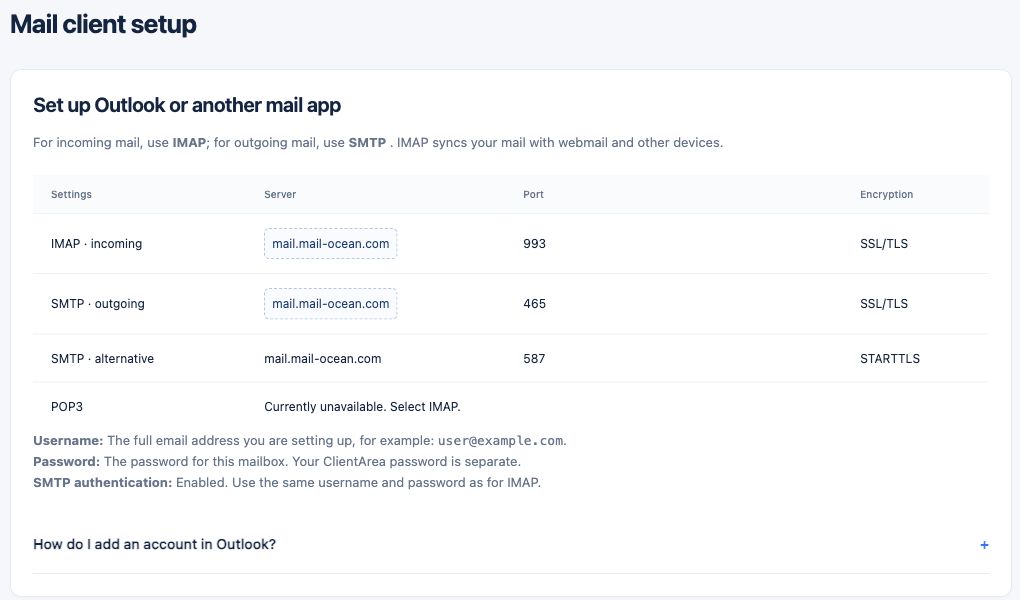
- Set incoming to mail.mail-ocean.com, port 993, SSL/TLS and outgoing to mail.mail-ocean.com, port 465, SSL/TLS.
- Use the full email address and mailbox password; enable SMTP authentication.
- Send and receive a test message.